

A web application firewall produces exactly one thing you can hold in your hands: logs. Blocking is a side effect of a rule matching; the log line is the record that it happened, why, and what the request looked like. If nobody reads those logs, the WAF is a very expensive way to return 403s.
This is the first of a three part series on logging with OWASP CRS:
- Part 1 (this post): what ModSecurity and CRS write to disk, how to read it, what to look for, and the two small additions we recommend before you ship a single line to a log platform.
- Part 2: ModSecurity, with the logs shipped to the Elastic Stack (Logstash, Elasticsearch, Kibana) and a ready made dashboard.
- Part 3: Coraza, with the logs shipped to Grafana and Loki through Alloy, and the same dashboard.
Parts 2 and 3 come with Docker Compose stacks you can run locally in a few minutes. Each post has its files attached, and a zip with all of them at the end. Both use the CRS project’s own container images and the same CRS release. Part 2 runs owasp/modsecurity-crs, NGINX with ModSecurity v3 (libmodsecurity). Part 3 runs coraza-crs, Caddy with Coraza. The examples in this post come from ModSecurity v3; most of it applies to ModSecurity v2 on Apache and to Coraza as well, and where the engines differ, we say so.
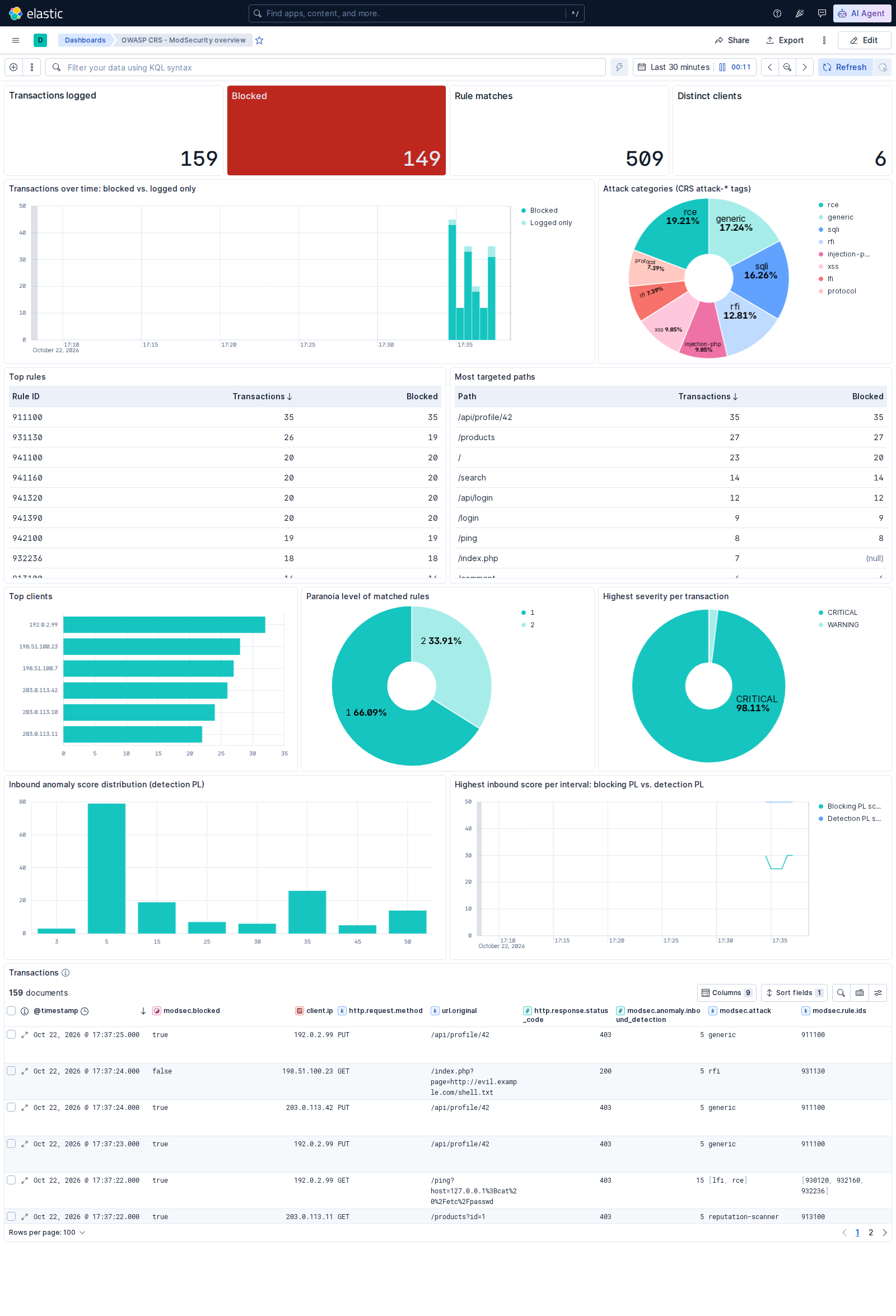
Where this series is heading: the CRS overview dashboard from Part 2, fed by the logs described below.
Three logs, two of which you want
ModSecurity can write three different things. Knowing which is which saves a lot of confusion.
The error log of the web server (error.log on NGINX and Apache) receives one line per rule match. This is the alert stream: compact, greppable, and the thing you tail -f while tuning. It is also where the blocking decision is logged.
The audit log receives one record per transaction, with the request headers, the request body if you ask for it, the response status and headers, and the list of every rule that matched. This is the evidence. It is what you open when an alert line is not enough to decide whether something was an attack or a false positive. By default only “relevant” transactions are written: those where a rule matched, or where the response status matches a pattern (SecAuditLogRelevantStatus, by default every 5xx and every 4xx except 404). Coraza only applies the second condition, so a request that scored but was not blocked is missing from its audit log; Part 3 shows the one-line rule that fixes it.
The debug log is a trace of the engine evaluating every rule against every request. It is indispensable when writing rules and useless in production. Leave it off (SecDebugLogLevel 0).
On top of those, the web server’s own access log tells you about every request, including the vast majority that never matched anything. You will want it next to the WAF logs when counting how much of your traffic the WAF touches at all.
Anatomy of an alert line
Here is a rule match as NGINX writes it to the error log. It is one line; we have wrapped it for readability.
2026/10/22 19:31:30 [info] 613#613: *3 ModSecurity: Warning. detected SQLi using libinjection.
  [file "/etc/modsecurity.d/owasp-crs/rules/REQUEST-942-APPLICATION-ATTACK-SQLI.conf"] [line "46"]
  [id "942100"] [rev ""] [msg "SQL Injection Attack Detected via libinjection"]
  [data "Matched Data: s&1c found within ARGS:id: 1' OR 1=1--"]
  [severity "2"] [ver "OWASP_CRS/4.30.0"] [maturity "0"] [accuracy "0"]
  [tag "application-multi"] [tag "language-multi"] [tag "platform-multi"]
  [tag "attack-sqli"] [tag "paranoia-level/1"] [tag "OWASP_CRS"]
  [tag "OWASP_CRS/ATTACK-SQLI"] [tag "capec/1000/152/248/66"]
  [hostname "localhost"] [uri "/"] [unique_id "179269749060.964266"] [ref "v9,11"],
  client: 172.22.0.1, server: localhost, request: "GET /?id=1%27%20OR%201=1-- HTTP/1.1", host: "localhost:8080"
The parts that matter, in the order you will look at them:
idis the rule that matched. The first three digits tell you the family: 942 is SQL injection, 941 is XSS, 930 and 932 are file access and command execution, 920 and 921 are protocol enforcement and protocol attacks, 913 is scanner detection, 95x are response side rules. The rule ID reference has the full map.msgis the human readable summary.datais what actually matched and where: the variable (ARGS:id) and the offending value. This is the single most useful field for deciding whether you are looking at an attack or at a false positive.severitymaps to the points the rule adds to the anomaly score: CRITICAL (2) adds 5, ERROR (3) adds 4, WARNING (4) adds 3, NOTICE (5) adds 2. ModSecurity v3 logs the number; v2 logs the name.tagentries carry the CRS metadata: the attack category (attack-sqli), the paranoia level the rule belongs to (paranoia-level/1), and references into CAPEC. Tags are what you will aggregate on.unique_idties this line to the audit log record of the same transaction.uri,client,requestandhosttell you what was hit and by whom.
Two words at the start of the message make the difference between a match and a verdict. ModSecurity: Warning. means a rule matched and added to the score. ModSecurity: Access denied with code 403 (phase 2). means the score crossed the threshold and the request was blocked. The blocking line always carries rule 949110 (or 949111 with early blocking, 959100 for responses) and the total score in its message:
ModSecurity: Access denied with code 403 (phase 2). Matched "Operator `Ge' with parameter `5'
  against variable `TX:BLOCKING_INBOUND_ANOMALY_SCORE' (Value: `5' ) ... [id "949110"]
  [msg "Inbound Anomaly Score Exceeded (Total Score: 5)"] [severity "0"] ...
One ModSecurity v3 detail that trips people up: the per-rule Warning lines are written at NGINX’s info level. With the default error_log ... warn; you only ever see the Access denied lines, never the rules that led to them. Set the level to info (in the official container: LOGLEVEL=info). ModSecurity v2 on Apache logs them at error level, so nothing to change there.
Anatomy of an audit log record
The audit log can be written in the classic multi-part text format (SecAuditLogFormat Native) or as JSON. Use JSON. Every log platform speaks it, and the native format needs a dedicated parser. The official container defaults to JSON (MODSEC_AUDIT_LOG_FORMAT=JSON) and to serial mode, one line per transaction.
{
  "transaction": {
    "client_ip": "203.0.113.11",
    "time_stamp": "Thu Oct 22 17:13:03 2026",
    "unique_id": "179269998371.110810",
    "is_interrupted": true,
    "request": {
      "method": "GET",
      "http_version": "1.1",
      "hostname": "localhost",
      "uri": "/products?id=1%27%20UNION%20SELECT%20username%2Cpassword%20FROM%20users--",
      "headers": { "Host": "localhost:8080", "User-Agent": "Mozilla/5.0 ...", "Accept": "*/*" }
    },
    "response": { "http_code": 403, "headers": { "...": "..." } },
    "producer": {
      "modsecurity": "ModSecurity v3.0.17 (Linux)",
      "connector": "ModSecurity-nginx v1.0.4",
      "components": ["OWASP_CRS/4.30.0\""]
    },
    "messages": [
      {
        "message": "SQL Injection Attack Detected via libinjection",
        "details": {
          "ruleId": "942100",
          "data": "Matched Data: s&1c found within ARGS:id: 1' UNION SELECT username,password FROM users--",
          "severity": "2",
          "tags": ["application-multi", "language-multi", "platform-multi", "attack-sqli",
                   "paranoia-level/1", "OWASP_CRS", "OWASP_CRS/ATTACK-SQLI", "capec/1000/152/248/66"],
          "file": "/etc/modsecurity.d/owasp-crs/rules/REQUEST-942-APPLICATION-ATTACK-SQLI.conf",
          "lineNumber": "46"
        }
      },
      { "...": "three more SQL injection rules at paranoia level 1, 5 points each" },
      { "message": "Inbound Anomaly Score Exceeded (Total Score: 20)", "details": { "ruleId": "949110", "...": "..." } }
    ]
  }
}
is_interrupted tells you whether the transaction was blocked. messages is the same information as the alert lines, already structured. The request block is where the forensic value is: which header, which parameter, which body. Which parts are recorded is controlled by SecAuditLogParts. The default in the container, ABIJDEFHZ, includes the request body (I, or C for the raw body) and the response body (E). Think about the second one before you ship it anywhere: it is either the block page or your application’s response, and the latter can contain personal data. The companion stacks leave part E out.
Two caveats with the v3 JSON format. The timestamp is in ctime style (Thu Oct 22 17:13:03 2026), in the local time of the process, with no zone; the container runs in UTC. And the response body is written whether or not the request was blocked, so the file grows quickly on a busy site. Rotate it.
Where the anomaly score goes
CRS does not block on a single rule. Every match adds points, and rule 949110 compares the total against the threshold (5 by default). The anomaly scoring page explains the mechanism; here we care about where the score shows up in the logs.
If the request was blocked, the total is in the 949110 message. If it was not blocked you only get the individual matches, which is a problem: a request that scored 3 at paranoia level 1 and 20 at paranoia level 2 looks like a single warning line, and you would never know that raising the paranoia level would have blocked it.
CRS has a rule for exactly this, 980170 in RESPONSE-980-CORRELATION.conf, which runs in the logging phase and writes a line like:
Anomaly Scores: (Inbound Scores: blocking=5, detection=25, per_pl=5-20-0-0, threshold=5) -
  (Outbound Scores: blocking=0, detection=0, per_pl=0-0-0-0, threshold=4) -
  (SQLI=25, XSS=0, RFI=0, LFI=0, RCE=0, PHPI=0, HTTP=0, SESS=0, COMBINED_SCORE=5)
How often it fires is controlled by tx.reporting_level (rule 900115 in crs-setup.conf, default 4: report whenever anything scored). On ModSecurity v2 the line lands in the Apache error log, and it is the most informative line CRS produces.
On ModSecurity v3 it never appears. The rule carries the noauditlog action, and libmodsecurity implements that action by dropping the message entirely rather than just keeping it out of the audit log. The result is that the most common CRS deployment, NGINX with ModSecurity v3, does not log its own anomaly scores unless you add a rule. Coraza does log 980170. We add a rule anyway, so that both engines write the same line and the same parser works on both.
The summary rule
Put this in RESPONSE-999-EXCLUSION-RULES-AFTER-CRS.conf, the file that is included after all CRS rules (in the container, mount it at /etc/modsecurity.d/owasp-crs/rules/RESPONSE-999-EXCLUSION-RULES-AFTER-CRS.conf):
SecRule TX:DETECTION_ANOMALY_SCORE "@gt 0" \
    "id:99901,\
    phase:5,\
    pass,\
    t:none,\
    log,\
    auditlog,\
    msg:'CRS summary: inbound_blocking=%{tx.blocking_inbound_anomaly_score} inbound_detection=%{tx.detection_inbound_anomaly_score} inbound_pl=%{tx.inbound_anomaly_score_pl1}-%{tx.inbound_anomaly_score_pl2}-%{tx.inbound_anomaly_score_pl3}-%{tx.inbound_anomaly_score_pl4} inbound_threshold=%{tx.inbound_anomaly_score_threshold} outbound_blocking=%{tx.blocking_outbound_anomaly_score} outbound_detection=%{tx.detection_outbound_anomaly_score} outbound_threshold=%{tx.outbound_anomaly_score_threshold} sqli=%{tx.sql_injection_score} xss=%{tx.xss_score} rfi=%{tx.rfi_score} lfi=%{tx.lfi_score} rce=%{tx.rce_score} phpi=%{tx.php_injection_score} http=%{tx.http_violation_score} sess=%{tx.session_fixation_score} blocking_pl=%{tx.blocking_paranoia_level} detection_pl=%{tx.detection_paranoia_level}',\
    tag:'crs-summary'"
It runs in phase 5 after CRS has added everything up, fires for every transaction that scored at least one point at the detection paranoia level, and writes a key=value line that any log pipeline can parse with one regular expression. It shows up both in the error log and in the audit log’s messages. Rule IDs 1 to 99,999 are reserved for local rules, so it cannot clash with CRS or a plugin. The exact file is in the
examples directory
.
With blocking_paranoia_level=1 and detection_paranoia_level=2, the line for the SQL injection above reads inbound_blocking=5 inbound_detection=25 inbound_pl=5-20-0-0: five points from PL1 rules, twenty more from PL2 rules that are evaluated but not enforced. That gap is the answer to “what would PL2 have caught”, measured on your own traffic, with no risk. Both dashboards in this series plot it.
What to look for
You have the alert stream and the evidence. Now the actual job: reading them. These are the questions we go through when we look at a CRS installation’s logs, roughly in order of how often they pay off.
Blocked requests: attack or false positive?
Start with the 949110 lines, or with is_interrupted: true. For each blocked request, look at the rules that contributed and at their data. An attack usually lights up several rules from the same family on a parameter that has no business containing that payload, and the matched data reads like an attack: ' UNION SELECT, <script>, ../../etc/passwd, ${jndi:. A false positive usually matches one or two rules on a parameter whose legitimate values happen to look suspicious: a free text comment field, a JSON blob, a password with special characters, a URL in a parameter.
A reliable tell is the paths. Attacks hit the paths that attackers guess (/wp-login.php, /.env, /cgi-bin/, /index.php?page=), often ones that do not exist on your site. False positives hit the paths your users actually use, repeatedly, with the same rule, from many different clients. “Same rule, same parameter, many clients” is the signature of a false positive; “many rules, one client, many paths” is the signature of a scanner.
The lab traffic in the companion stacks includes one deliberate false positive: PUT /api/profile/42 is blocked by rule 911100, “Method is not allowed by policy”, because PUT is not in CRS’s default list of allowed methods. It is a classic. Your REST API needs PUT, PATCH and DELETE; CRS does not know that until you tell it in crs-setup.conf (rule 900200). The dashboards make it stand out immediately: one rule, one path, every client, blocked every time.
Once you know which it is, the false positives and tuning page and Part 6 of the migration series cover how to write the exclusion.
Matches that did not block
Requests that scored but stayed under the threshold are easy to ignore and worth a weekly look. At PL1 these are mostly protocol anomalies: a Host header that is a bare IP address (920350, 3 points), a missing Accept header, an unusual content type. Individually they are noise. In aggregate they describe your clients: monitoring probes, mobile SDKs, integrations written against an old version of your API. If one of them is a partner integration, you want to know before you raise the paranoia level and it starts failing.
What a higher paranoia level would have done
This is where the summary rule earns its keep. Filter for transactions where inbound_detection is at or above the threshold and inbound_blocking is below it. Those are the requests that PL2 (or whatever your detection level is) would have blocked. If they are all attacks, you have your evidence for raising the level. If some of them are legitimate, you have your list of exclusions to write first. The paranoia levels page explains the trade-off in detail; the logs tell you where you stand on it.
Top rules and top paths
Count matches per rule ID and per path. The distribution is never flat. The top of the rule list is either a false positive (one rule, high count, legitimate path) or the attack of the week (a family of rules, many paths, few clients). The top of the path list separates the paths that exist and are being attacked, which is your real attack surface, from the paths that do not exist and are being guessed, which is background noise you can mostly ignore. If a path that takes user input never appears in either list, ask yourself why. It may be that nobody attacks it. It may also be that the WAF does not see it: a request body that is not inspected because of its content type, a JSON body larger than the limit, an endpoint that bypasses the proxy.
Attack categories and what they say about your protections
The attack-* tags give you a breakdown by category: attack-sqli, attack-xss, attack-lfi, attack-rce, attack-rfi, attack-injection-php, attack-protocol, attack-reputation-scanner, attack-fixation, attack-generic. Over a month they tell you two things. First, what your attackers care about, which is usually SQL injection and command injection on anything with a parameter, plus a steady hum of scanners. Second, which protections are actually being exercised. A category that never shows up is not necessarily good news. If your application is a PHP shop and attack-injection-php is at zero, check that request bodies are being inspected (SecRequestBodyAccess On, which the container enables by default) and that the content types your application uses are in the allowed list, because CRS cannot inspect what the engine does not parse.
Scanners and hygiene
Rule 913100 matches known scanner user agents, and the 930130 restricted files rule matches requests for /.git/config, /.env, backup files and the like. Neither is an emergency. Both are useful inventory. A scanner that comes back every day from the same address is a candidate for a block at the network level, where it is cheaper. A request for /.env that returns 200 instead of 403 is a problem with your deployment, not with the WAF.
The response side
Rules 950 to 956 look at responses: directory listings, SQL error messages, stack traces, PHP and Java errors, web shells. A match here means your application leaked something. The WAF blocked the response (or logged it, if you are in detection mode), but the bug that produced the error page is still there. These are the matches to forward to the application team rather than to the security team.
The absence of logs
The last thing to look for is nothing at all. A WAF that logs nothing for a day is almost never a WAF that saw no attacks. Check that the rule engine is on (SecRuleEngine On, or DetectionOnly while tuning), that the audit log is not stuck on a full disk, that log rotation did not leave the engine writing to a deleted file, and that traffic actually goes through the proxy. Count requests in the access log and relevant transactions in the audit log; the ratio should be small but not zero. If you use sampling mode, remember that only the sampled share is inspected and logged.
Settings checklist
Before shipping logs anywhere, this is what we set. The second column is the environment variable for the official ModSecurity container (the Coraza image uses the same names with a CORAZA_ prefix instead of MODSEC_); the third is the directive for a hand built installation.
| Setting | Container | Directive |
|---|---|---|
| Audit log for relevant transactions only | MODSEC_AUDIT_ENGINE=RelevantOnly | SecAuditEngine RelevantOnly |
| JSON audit log, one line per transaction | MODSEC_AUDIT_LOG_FORMAT=JSON, MODSEC_AUDIT_LOG_TYPE=Serial | SecAuditLogFormat JSON, SecAuditLogType Serial |
| Audit log to a file a shipper can tail | MODSEC_AUDIT_LOG=/var/log/modsecurity/audit/modsec_audit.log | SecAuditLog /path/to/modsec_audit.log |
| Request headers and body, response headers, no response body | MODSEC_AUDIT_LOG_PARTS=ABIJFHZ | SecAuditLogParts ABIJFHZ |
| Per-rule alerts visible on ModSecurity v3 | LOGLEVEL=info, ERRORLOG=/var/log/modsecurity/audit/nginx_error.log | error_log /path/to/error.log info; |
| Anomaly scores in both logs | mount the summary rule as RESPONSE-999-EXCLUSION-RULES-AFTER-CRS.conf | add the summary rule after the CRS includes |
| Evaluate one paranoia level above the blocking one | BLOCKING_PARANOIA=1, DETECTION_PARANOIA=2 | tx.blocking_paranoia_level=1, tx.detection_paranoia_level=2 |
| Real client address behind a load balancer | mount nginx-realip.conf into /etc/nginx/conf.d/ | set_real_ip_from + real_ip_header at http level |
A note on the last row. The container can configure NGINX’s realip module through environment variables, but it writes the directives into the location block, and NGINX applies location level realip settings after the ModSecurity connector has already read the connection address. Declare set_real_ip_from and real_ip_header at http level instead, as the
example file
does, and ModSecurity will log the address from X-Forwarded-For. Only trust the proxies you actually control.
The companion stacks use ABIJFHZ, so the response body never reaches the log file. Part D is reserved and unused, so leaving it out changes nothing.
The summary rule, the realip snippet and the traffic generator used in Parts 2 and 3 can be downloaded from here:
Files from this post
generate-traffic.sh(5.2 KB)waf/nginx-realip.conf(1.1 KB)waf/RESPONSE-999-EXCLUSION-RULES-AFTER-CRS.conf(2.0 KB)
Before you build a dashboard
You do not need a log platform to start. With the error log at info level and the summary rule in place, these two lines answer most of the questions above:
# Matches per rule, most frequent first. Leaves out the blocking and
# correlation rules (949, 959, 980) and the summary rule, which would
# otherwise sit at the top of the list on every site.
grep 'ModSecurity: Warning' error.log \
  | grep -vE '\[id "(9(49|59|80)[0-9]{3}|99901)"\]' \
  | grep -o '\[id "[0-9]*"\]' | sort | uniq -c | sort -rn | head -20

# Requests that a higher paranoia level would have blocked
grep 'CRS summary' error.log | grep -E 'inbound_blocking=[0-4] ' | grep -vE 'inbound_detection=[0-4] '
And from the JSON audit log with jq:
# Blocked transactions: client, method, URI and the rules that fired
jq -r 'select(.transaction.is_interrupted) | .transaction as $t
       | [$t.client_ip, $t.request.method, $t.request.uri,
          ([$t.messages[].details.ruleId] | join(","))] | @tsv' modsec_audit.log
When the questions become “how did this change since last week” and “show me every request from that client”, it is time for a platform. Part 2 does it for ModSecurity with the Elastic Stack; Part 3 does it for Coraza with Grafana and Loki. Both start from the configuration described here.
Download
Everything this post uses, in one archive. It unpacks to a crs-logging/ folder with a short README.
All files
crs-logging-waf.zip(6.7 KB)
 Felipe Zipitria